> ## Documentation Index
> Fetch the complete documentation index at: https://docs.shoppex.io/llms.txt
> Use this file to discover all available pages before exploring further.
# Loadout
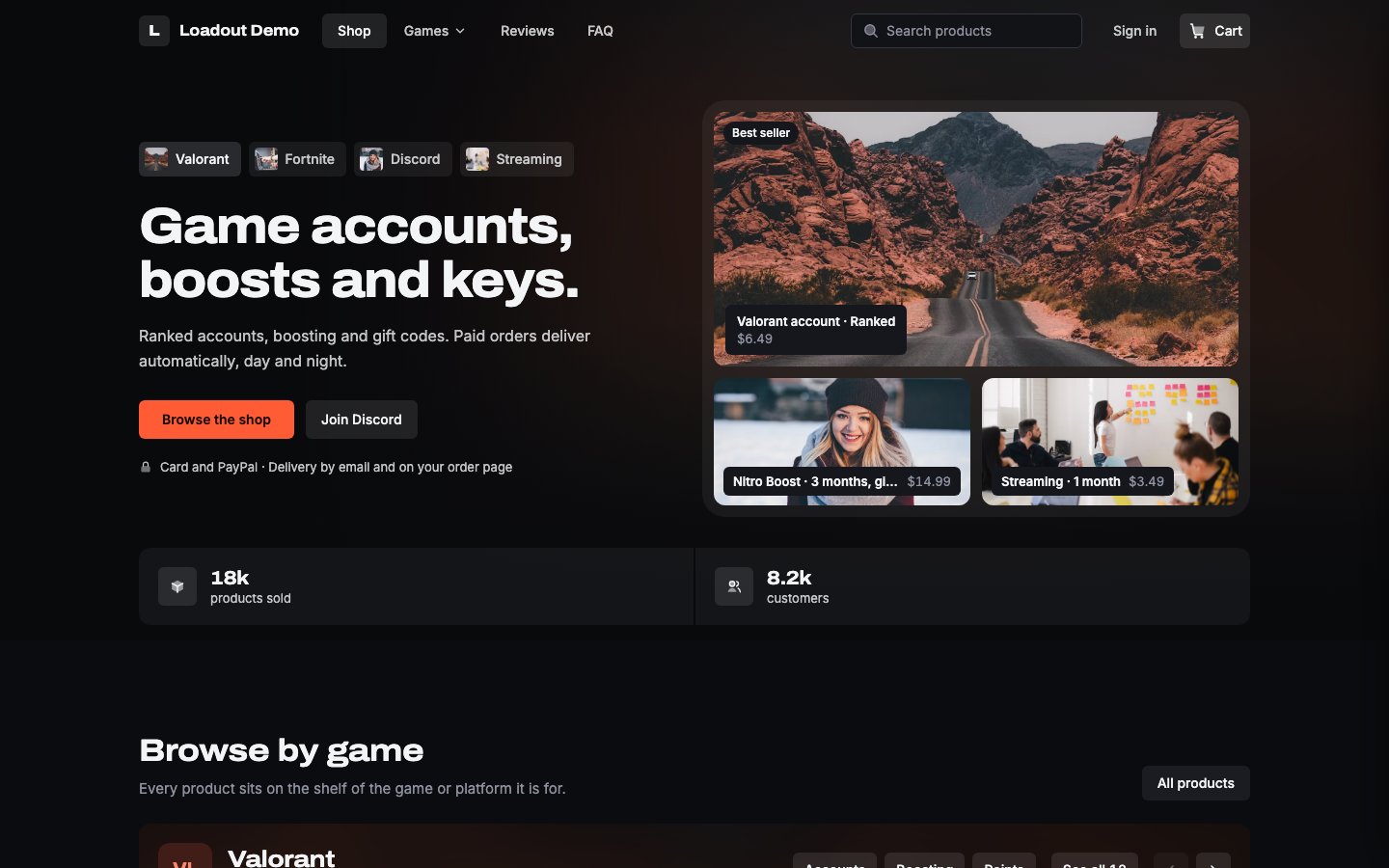
> A dark storefront for game shops, as a Theme Store theme and as a code storefront. You pick the accent, background and text colors and the card radius; the rest of the look follows them.
Loadout is a free storefront for shops that sell game accounts, boosts, keys and gift codes. It comes in two forms with the same design:
* **Loadout theme**, in the Theme Store. You edit it in the visual Builder.
* **Loadout code template**, under **Advanced**. A React and Vite project you own, like [ForkMe](/storefront/forkme).
 ## What you change
Loadout is dark only and curated. You change:
* **A look.** Four looks set all of the below in one click: **Blaze** (the shipped orange), **Volt** (acid lime, tight corners), **Ion** (electric cyan) and **Plasma** (violet, soft corners). In the Builder they are under **Theme presets**, in the code template on the **Design** tab.
* **The accent color.** It colors buttons, links and highlights. Labels on the accent switch between near-black and white so they stay readable.
* **The background and text colors.** Cards, trays and borders follow the background, and muted text follows the text color. Loadout stays dark: the background needs at least 15:1 contrast against white (a grey of `#262626` or darker) and the text at least 14:1 against black (a grey of `#D3D3D3` or lighter). A lighter background or darker text is refused with a message, so every text stays readable.
* **The card radius.** Buttons, tiles and fields take a share of it, so one value changes every corner.
* **The hero.** Pick one of three styles on the Hero block: **Ambient art** (blurred art from your best seller), **Shelf wall** (a tilted wall of your product art) or **Spotlight drop** (one product you pick, on a lit stage).
* **Copy, sections and their order.** Hide a section or move it like on any theme.
Status and rating colors are fixed. Loadout has one accent and derives its muted text, so the Builder shows no secondary accent or muted color for it.
## Your product pictures decide the look
When you upload a product picture, Shoppex records whether it is artwork (a cover, a photo) or a logo, and its main color. Loadout uses this:
* A logo is shown on a plate instead of being cropped like a cover.
* If every picture in your shop is a logo, the hero switches to its logo treatment.
* If your products have no pictures, the hero draws their initials instead.
There is nothing to set. A Spotlight product that sells out or is hidden falls back to Ambient art, and your choice comes back when the product is available again.
## Get started
Open **Store → Storefronts**, choose **New Storefront**, and add **Loadout** under **Templates**. Open it in the Builder, set your accent and hero, then publish.
Open **Store → Storefronts**, choose **New Storefront**, and create a storefront from **Loadout** under **Code**. Then pull it with the [Theme CLI](/agents/cli-themes), like [ForkMe](/storefront/forkme#get-the-template). Read `AGENTS.md` at the project root before you change anything: it lists the files, the fixed tokens and the rules the platform checks.
The code template has no Instant Buy. Code storefronts cannot spend a buyer's balance, so buyers check out from the cart. The Loadout theme keeps Instant Buy.
This documentation is built and hosted on [Mintlify](https://mintlify.com), a developer documentation platform.
## What you change
Loadout is dark only and curated. You change:
* **A look.** Four looks set all of the below in one click: **Blaze** (the shipped orange), **Volt** (acid lime, tight corners), **Ion** (electric cyan) and **Plasma** (violet, soft corners). In the Builder they are under **Theme presets**, in the code template on the **Design** tab.
* **The accent color.** It colors buttons, links and highlights. Labels on the accent switch between near-black and white so they stay readable.
* **The background and text colors.** Cards, trays and borders follow the background, and muted text follows the text color. Loadout stays dark: the background needs at least 15:1 contrast against white (a grey of `#262626` or darker) and the text at least 14:1 against black (a grey of `#D3D3D3` or lighter). A lighter background or darker text is refused with a message, so every text stays readable.
* **The card radius.** Buttons, tiles and fields take a share of it, so one value changes every corner.
* **The hero.** Pick one of three styles on the Hero block: **Ambient art** (blurred art from your best seller), **Shelf wall** (a tilted wall of your product art) or **Spotlight drop** (one product you pick, on a lit stage).
* **Copy, sections and their order.** Hide a section or move it like on any theme.
Status and rating colors are fixed. Loadout has one accent and derives its muted text, so the Builder shows no secondary accent or muted color for it.
## Your product pictures decide the look
When you upload a product picture, Shoppex records whether it is artwork (a cover, a photo) or a logo, and its main color. Loadout uses this:
* A logo is shown on a plate instead of being cropped like a cover.
* If every picture in your shop is a logo, the hero switches to its logo treatment.
* If your products have no pictures, the hero draws their initials instead.
There is nothing to set. A Spotlight product that sells out or is hidden falls back to Ambient art, and your choice comes back when the product is available again.
## Get started
Open **Store → Storefronts**, choose **New Storefront**, and add **Loadout** under **Templates**. Open it in the Builder, set your accent and hero, then publish.
Open **Store → Storefronts**, choose **New Storefront**, and create a storefront from **Loadout** under **Code**. Then pull it with the [Theme CLI](/agents/cli-themes), like [ForkMe](/storefront/forkme#get-the-template). Read `AGENTS.md` at the project root before you change anything: it lists the files, the fixed tokens and the rules the platform checks.
The code template has no Instant Buy. Code storefronts cannot spend a buyer's balance, so buyers check out from the cart. The Loadout theme keeps Instant Buy.
This documentation is built and hosted on [Mintlify](https://mintlify.com), a developer documentation platform.